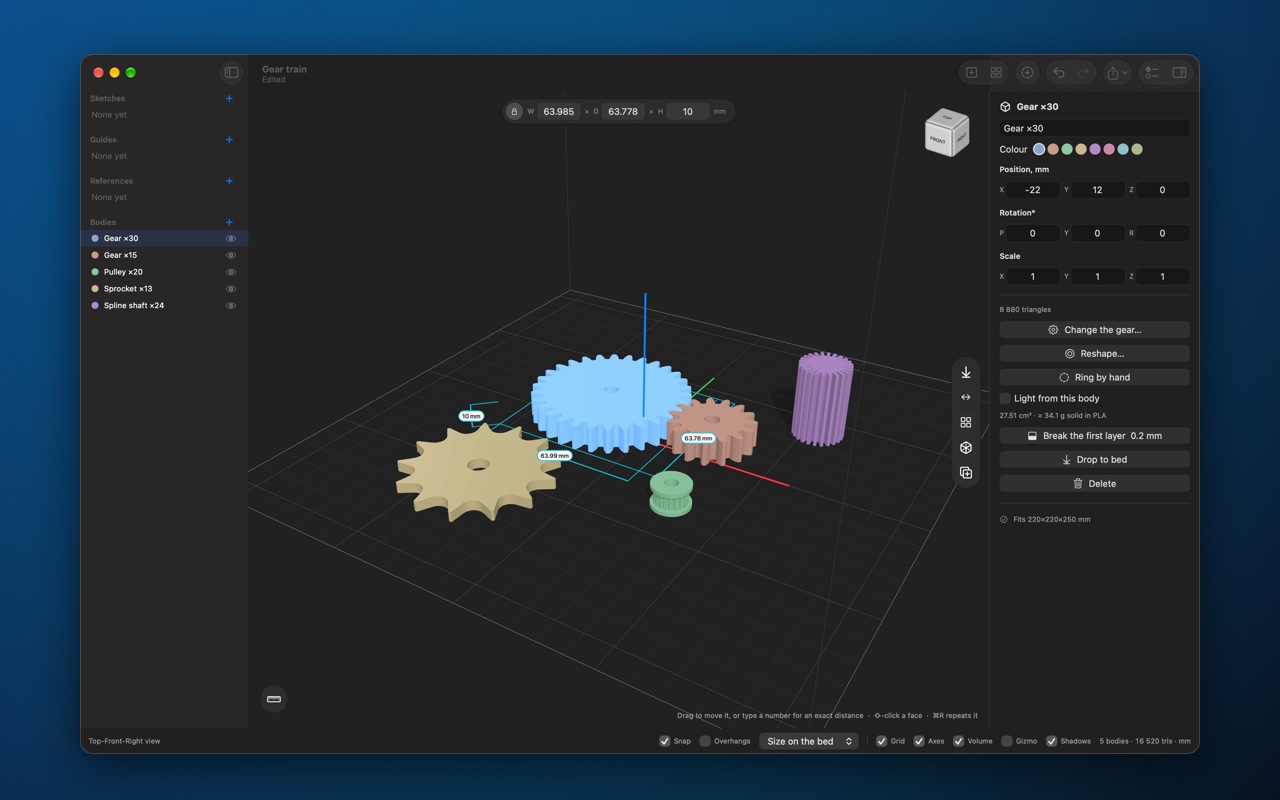
Brim CAD 26.1.0
models parts for 3D printing: 36 shapes and 15 ready-made jobs, from gears and threads to cases with lids, a check before you print, and one click to send the model to your slicer.

models parts for 3D printing. Everything is in millimetres, Z is up, and the plate under the model is your printer's bed. What sits on it is what comes out.
It is built for parts that have to fit other parts: a gear on a shaft, a lid on a case, a screw in a hole. You type the numbers, the app builds the part, and your slicer gets a closed model of the right size.
SHAPES
• 36 shapes, each shown as a picture of itself: blocks, tubes, threads, springs, knurled knobs, vases and lettering
• Gears, sprockets, belt pulleys, chains, ratchets, cams, splines, worm drives and augers from module, teeth and pitch
• Panels and fittings: vent grilles, insert bosses, print-in-place hinges and ball joints, encoder discs, fans and impellers
• Name ornaments, snowflakes, stars and radial patterns
• A shape keeps its numbers: reopen it later and change 20 mm to 22 mm instead of drawing it again
WHOLE JOBS
• A case with a lid, vents and screw bosses
• A hose adapter, a fit-test coupon, a jigsaw, a QR code plate
• A sundial for where you live, a lithophane from a photo, an acoustic diffuser
• A cookie cutter, a stamp and a stencil from a drawing
WORKING EXACTLY
• Every drag lands on the snap step, and a number typed during a drag moves by exactly that much
• A ruler, sizes round the selection, kept measurements and guides
• Look inside a part through a guide plane without cutting it
CHANGING A BODY
• Add, subtract and intersect bodies
• Fillet and chamfer an edge, push and pull a face, cut ISO clearance holes for screws
• Lettering and texture on a face, cast a cavity, make a body lighter, repeat in a row or round a circle, mirror and align
• Sketches: extrude, revolve and sweep
• Trace a photo or a drawing into an outline, and model over a reference picture at its real size
BEFORE YOU PRINT
• Overhangs steeper than your limit turn red
• One check finds open surfaces, faces that cross, parts off the bed, parts too big for the printer and walls thinner than the nozzle
• A part too big for the bed splits into equal pieces pinned back together
• Pins, tongues, dovetails and snap fits between any two bodies
• Fit clearance, shrinkage and an elephant's foot chamfer in Settings
IN AND OUT
• Open in your slicer in one click: Bambu Studio, Orca, PrusaSlicer or any other
• Export 3MF, STL, OBJ and USDZ. 3MF keeps the unit, the names, the colours and where each part sits on the bed
• Import STL, 3MF, OBJ, USDZ, PLY and SVG
• Quick Look previews and thumbnails of projects in the Finder
• A part library and presets
INTERFACE
• Light and dark appearance
• A built-in manual in ten chapters, from your first part to keys and gestures, with a chapter on what the app does not do
• English and Russian
• No account, no tracking: nothing you make leaves your Mac unless you send it
Version history
Enclosures
• A sliding lid now runs in a real groove round three walls and stops against the back, instead of lifting straight out. It slides in at any corner radius.
• A sliding lid can sit level with the top: a raised panel fills the opening and the front, so the closed case is flat.
• Snap-fit lids hold on a flat face rather than a thin ridge, and every lid comes out lying the way it prints.
• Screw holes in the lid can be plain, counterbored for a socket cap or countersunk for a flat head.
• Place openings from the middle of a face, as a datasheet does, or from the corner, as a caliper reads the finished box.
• Cut-outs and vents in the lid, and round holes in the walls go all the way through.
• Rounded corners of any radius keep the groove and the screw posts inside the wall.
Previews
• The preview in every wizard shows the sizes round the shape, and where each opening sits. A switch hides them.
• Larger previews, with no more flicker where a part stands on the bed.
Lattices and sketches
• 18 new lattice patterns, among them rosettes, Moroccan lanterns, star and cross, hemp leaf, chevrons and tumbling blocks.
• A fade can turn the openings as well as shrink them.
• Sketching helps more: snapping, typed side lengths, axis lock, mirror and closing a shape, and point coordinates you can type or nudge.
Also
• Projects saved before the rename open again.
• Fixes for the Russian interface and the tooltips.