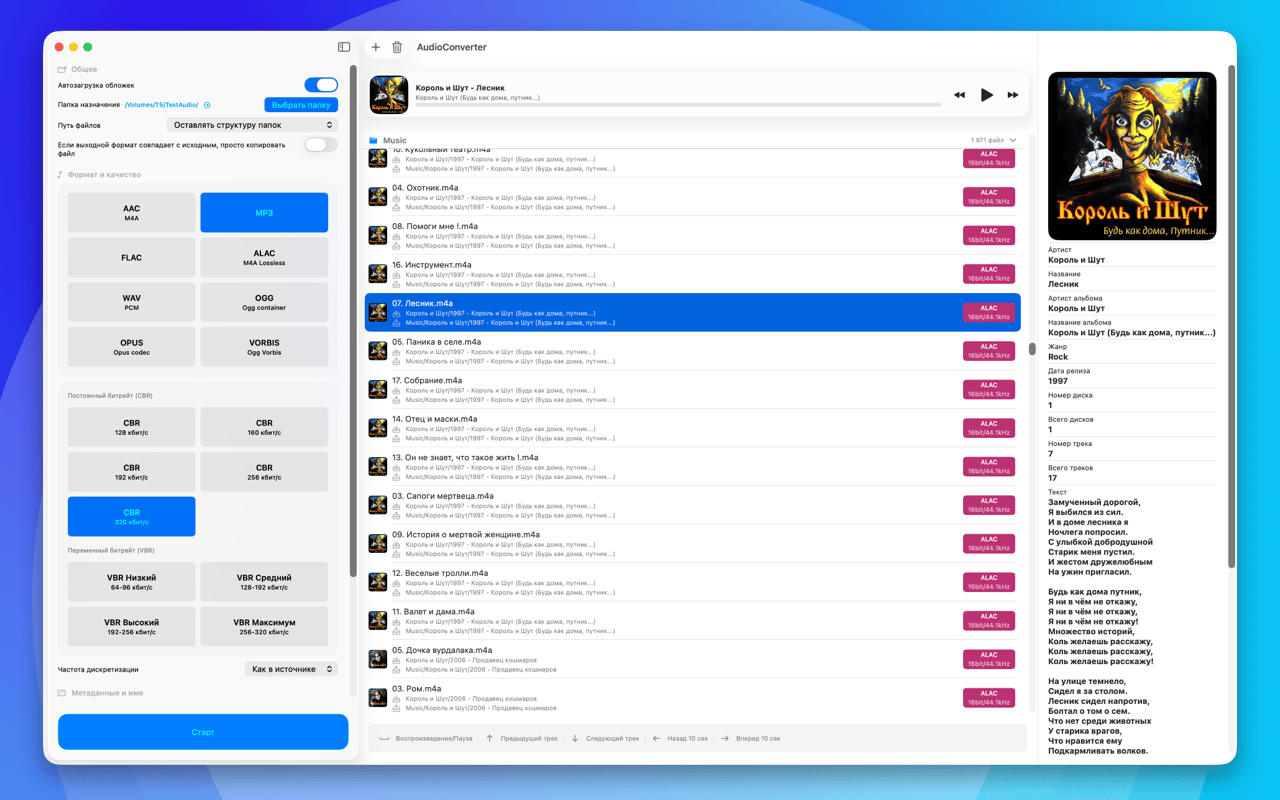
AudioConverter 27.9.24
converts audio quickly and accurately between MP3, AAC, ALAC, FLAC, WAV, AIFF, OGG, OPUS and VORBIS: batch processing, metadata and artwork, EBU R128 loudness normalization, and spectral analysis of your files.

converts audio quickly and accurately between the popular formats: MP3, AAC, ALAC, FLAC, WAV, AIFF, OGG, OPUS and VORBIS. Batch processing, metadata and artwork transfer, flexible quality settings, and a workflow that makes sense for everyday work with a music library.
And it does more than shuffle bytes around. It shows you what is really inside a file, brings loudness in line with the broadcast standard, and warns you when the settings you picked make no sense.
CONVERSION
• Output formats: MP3, AAC, ALAC, FLAC, WAV, AIFF, OGG, OPUS, VORBIS
• Input also accepts WavPack, AIFF, CAF, M4A and M4R
• Extract the audio track from video files
• Split a disc image (one large FLAC or WAV plus a CUE) into individual tracks: names and tags come from the CUE sheet
• Batch processing of individual files and whole folders
• A size forecast before you start, with a warning about pointless settings, such as re-encoding from lossy to lossless
QUALITY
• CBR, VBR and ABR, bitrate, sample rate and bit depth for the formats that support them
• The HE-AAC and HE-AAC v2 profiles for AAC
• Resampling with a choice of algorithm quality, up to mastering grade and minimum phase
• Dithering with noise shaping: applied only when the bit depth actually drops
LOUDNESS
• EBU R128 normalization, per track or per album, targeting -23, -18 or -14 LUFS
• Your choice: write ReplayGain tags, or apply the gain to the audio itself
• Clipping protection and a manual ±dB gain
ANALYSIS
• A spectrogram of the whole file: zoom, panning, a choice of FFT window, PNG export
• Cutoff frequency detection, telling you when a "lossless" file was in fact made from a lossy source
• A live spectrum while you listen
• SHA-256 and MD5 checksums to confirm the source file is the one you think it is
PROCESSING
• Fade in and fade out
• Silence trimming at the start and at the end
• Mono downmix and single-channel selection
FILES AND METADATA
• Metadata preserved and carried over, artwork included
• Customisable filename templates and overwrite rules
• Output layout: by artist, by artist and album, everything in one folder, or keeping the original structure
WITHOUT THE WINDOW
• Conversion straight from the clipboard: a menu bar icon and the ⌃⌥⌘C shortcut
• Settings move as a single file: export and import
INTERFACE
• Clean and minimal, fully translated into 15 languages: English, German, Russian, Spanish, French, Portuguese (Brazil), Italian, Japanese, Simplified Chinese, Korean, Dutch, Polish, Slovak, Turkish and Swedish
Version history
Fixed: closing the window no longer turns off the menu bar icon and the ⌃⌥⌘C shortcut, and "Open Audio Converter" brings back the window with the file list.
Fixed: pausing near the end of a track and pressing play resumes from the same spot instead of starting over.
Fixed: long titles no longer fail to write, and a title starting with a dot ("...And Justice for All") no longer makes a hidden file.
Artwork from the folder is now cover, folder or front rather than a back cover or a booklet scan.
Large folders are added faster, and the soundtrack is extracted from video without freezing the window.
Fixed: artwork lookup on a bad network no longer holds up the conversion.
Fixed a crash on damaged DSD files; 48 kHz-based DSD now gets a clear refusal instead of playing slower.
Fixed: the equalizer is heard when listening to DSD128 and above too.
Fixed: a WAV with "dts" in its name is no longer rejected, DTS is recognised by the contents.
Fixed: a conversion with nothing but warnings (say, a file named "(1)") no longer looks like a failure.
Fixed: access to a renamed or moved folder no longer has to be granted again.
Settings from a backup are now brought into the allowed range.
New: an equalizer with twelve bands from 20 Hz to 20 kHz, ready-made curves and your own presets. You hear the curve while listening and the same curve is applied to the result.
New: a Simple mode for the sidebar with the format, the quality level, the destination folder and the plan for the batch; everything else lives in Pro. A Pro setting that changes the result stays visible in Simple mode and one tap resets it.
Formats and quality are captioned tiles now: what the format is for and what bitrate the level means.
Fixed CPU load: a stopped player used to eat 25 to 30 percent, now it costs nothing.
Fixed: the analysis of the previous track no longer covers the current one.
Temporary intermediate files are cleaned up on quit and at launch, even after a crash.
The sidebar and the detail pane are wider, the new rows need the room.
Added input formats: Monkey's Audio (APE), Musepack, TTA, Speex, Shorten, DSD (DSF and DFF) and tracker music (MOD, XM, IT, S3M). CUE + APE images split too.
FLAC encoding reworked: 16-bit files stay 16-bit (they used to become larger 24-bit files), and there is now a bit depth choice, a compression level and sample rates up to 384 kHz.
Fixed reading 32-bit FLAC files: they used to fail to convert.
DSD at any rate: DSD64 up to DSD1024, in DSF and DFF.
Ready-made presets for the job: iPhone, car audio, FLAC archive, audiobook, podcast.
A loudness card for each file: LUFS, loudness range, true peak and DR.
The spectrogram, loudness and checksum are calculated as soon as you select a file.
CUE sheets in French, Japanese and other languages are read without garbled text, and the encoding can be picked by hand.
A context menu for files, menu commands with keyboard shortcuts (⌘O, ⌘↩, ⌘., ⌘⌫) and a separate settings window (⌘,).
Start without a destination folder now asks you to choose one, and after conversion the results can be shown in Finder right away.
Audio files open in the app from Finder, by dropping them on the Dock icon and via “Open in…” on iPhone.
Bitrate selection is more compact: a mode switch and a list instead of a grid of buttons, and the VBR size forecast follows the quality level.
Artwork size can be limited for older players and car stereos.
Fixed loudness normalization with mono downmix: the result fell 3–6 dB short of the target.
The spectrogram no longer calls hi-res and DSD made from a CD-quality master “made from a lossy source”.
Before you start, you see how much space the result takes and whether it fits, which files already exist and what will happen to them, and which names clash.
Fixed VBR for AAC: the chosen quality now really affects the result; before, every level produced the same file.
Fixed hi-res to AAC: a sample rate above 48 kHz drops to a related rate instead of failing.
Fixed a crash when splitting a CUE image into MP3 with mono downmix.
Tracks split from a CUE image get loudness normalization and ReplayGain tags, and compilations get the album artist and track count.
Fixed splitting CUE images stored as WavPack.
Fixed lost files when two files in one batch get the same name: the second is saved as “(1)” and the log says so.
Fixed: FLAC no longer loses bit depth because of a setting picked earlier for WAV.
Fixed: the chosen sample rate always applies to Ogg Vorbis; the choice is gone for Opus, which always runs at 48 kHz.
Fixed tag-based folders: “AC/DC” no longer turns into nested folders.
Skipped files are now marked as skipped instead of converted.
A stopped or failed conversion no longer leaves a half-written file behind.
Stop reacts faster, and a new run waits for the previous one to finish.
Fixed artwork search for titles containing “&” and “#”.
Clearer error messages in the log and a translated folder access window.
A large folder is added without freezing the window: the scan now runs in the background.
The file list responds to the keyboard again: arrows move between files, space plays and pauses.
The player shows pause correctly after moving to the next track on its own, and arrow seeking covers the promised 10 seconds.
Added audio processing: fade in and out, silence trimming at both ends, manual gain, mono downmix and single-channel pick.
Added a choice of resampling quality, plus dithering that kicks in on its own when the bit depth actually drops.
Added AIFF output, average bitrate (ABR) and the HE-AAC and HE-AAC v2 profiles.
The spectrogram now does real zoom with re-analysis, a choice of FFT window, image export and a live spectrum during playback.
Added an output size forecast together with warnings about pointless settings, such as lossy to lossless.
Added SHA-256 and MD5 checksums to confirm the source file is the one you think it is.
Settings now export and import as a single file.
Conversion straight from the clipboard: a menu bar icon and ⌃⌥⌘C, no window needed.
Spectrogram
• A full-file spectrogram with zoom, panning, a choice of FFT window, and PNG export.
• The app finds the cutoff frequency and tells you when a "lossless" file was in fact made from a lossy source.
• A live spectrum while you listen.
Loudness
• EBU R128 normalization, per track or per album, targeting −23, −18 or −14 LUFS.
• Your choice: write ReplayGain tags, or apply the gain to the audio itself.
• Clipping protection and a manual ±dB gain.
Processing
• Resampling with a choice of algorithm quality, up to mastering grade and minimum phase.
• Dithering with noise shaping, applied only when the bit depth actually drops.
• Fade in and out, silence trimming at both ends, mono downmix and single-channel selection.
Files
• Extract the audio track from video files.
• Filename templates and folder layouts: by artist, by artist and album, everything in one folder, or keeping the original structure.
• A size forecast before you start, with a warning about pointless settings — such as re-encoding from lossy to lossless.
Languages
• The interface is now translated into 14 languages: English, German, Russian, Spanish, French, Portuguese (Brazil), Italian, Japanese, Simplified Chinese, Korean, Dutch, Polish, Turkish and Swedish.